Making the Connection: Broadband Service Application
Broadband Connection: What to Expect Every Step of the Way
We want to ensure the process between registering for service and getting online is seamless, so we’ve created a quick video walkthrough to show exactly what happens from the moment you apply until your internet service is activated.
Here’s a closer look at each step.
Step 1: Confirm Your Address is Ready for Service
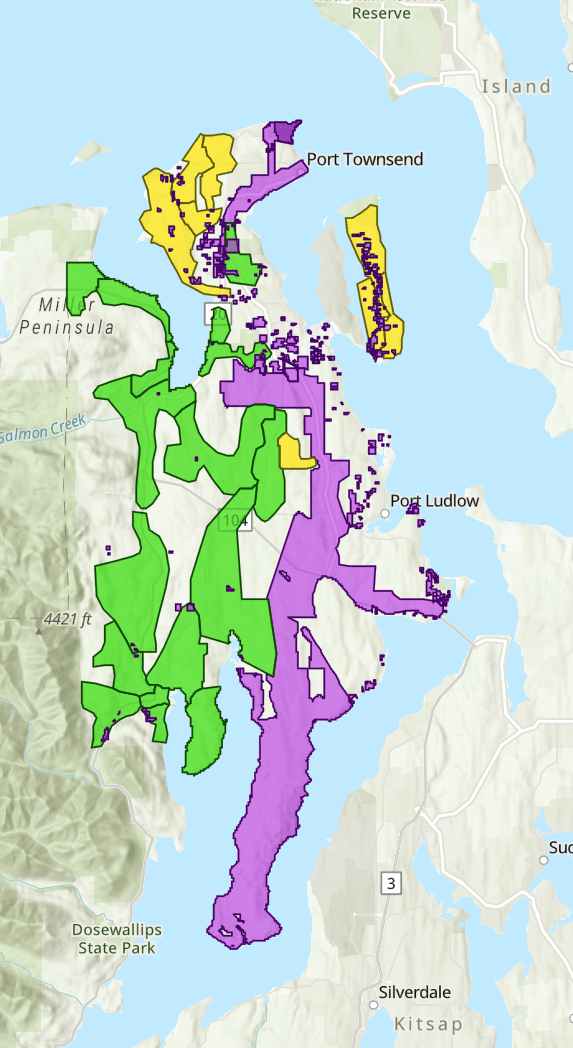
The first step is making sure your home is located within an area where Jefferson PUD’s fiber network is available.
Our online fiber map allows you to search your address and see whether service is currently available or if construction is still underway nearby. Click HERE to check whether your home is “active” or upcoming.
If your address is eligible (in an “active” area), you’re ready to move on to the service application.
Step 2: Complete Your Service Application
Once you’ve confirmed service is available, you’ll complete a short online application. Log on, or click HERE, to complete the service application for your home.
This information helps our broadband team verify your location and contact information, and connect the broadband service with your other PUD services. It also helps us begin coordinating your installation.
Please note: If your email address or phone number changes after applying, please let us know so we can reach you when it’s time to schedule your installation.
Step 3: Schedule Your Home Installation
After your application has been processed, our team will contact you to schedule an installation appointment.
During this visit, a Jefferson PUD technician will complete the work needed to connect your home to the fiber network.
Every property is a little different, so installation times may vary depending on your home’s layout and the existing fiber infrastructure.
Looking to connect service via a Qualified Internet Service Provider (QISP) through the PUD’s network?
If you plan to use a QISP for your service, please make note of when fiber service in your area is active on the mapping. Once active, please reach out to the service provider. The QISP will complete the service application on your behalf. Once processed, a installation date/time email will arrive from the PUD. A PUD fiber technician will complete the portion of installing fiber from the outside to the inside of the home and verify connectivity. The QISP will then schedule a final equipment installation (non-PUD-issued equipment).
Want to learn more about the PUD’s open access network and the QISP’s in our area? Click HERE.
What Happens During Installation?
Your technician will install the equipment needed to bring the fiber connection into your home.
This typically includes:
- Connecting your home to the existing fiber network.
- Bringing the fiber into your home.
- Installing the interior fiber equipment.
- Testing the connection to ensure everything is working properly.
Our technicians will also answer any questions you have before completing the installation.
Why Do I Have a Gray Fiber Box But No Internet Yet?
Customers commonly note the PUD-branded gray utility box having been installed on the outside of their home and wonder why they aren’t connected yet. The exterior box is just one part of the process. The box contains your dedicated fiber, however if no installation email has arrived, it means work remains upstream of your home (this could be further installations of main line or fiber splicing). Internet service isn’t truly activated until the in-home installation has been completed and the equipment inside your home has been installed and tested.
Seeing the gray box is a critical step, and this means you should keep an eye on the active fiber map HERE for the next step via email!
After Installation
Once the installation is complete, your technician will verify that your connection is working correctly.
From there, you’ll be ready to enjoy reliable, high-speed broadband service delivered over the PUD’s growing fiber network.
Need Help?
Whether you’re checking service availability, completing your application, or waiting to schedule your installation, our customer service team is here to help.
If you’ve already applied for service and your contact information has changed, please contact Jefferson PUD Customer Service at (360) 385-5800 or via email at: customerservice@jeffpud.org